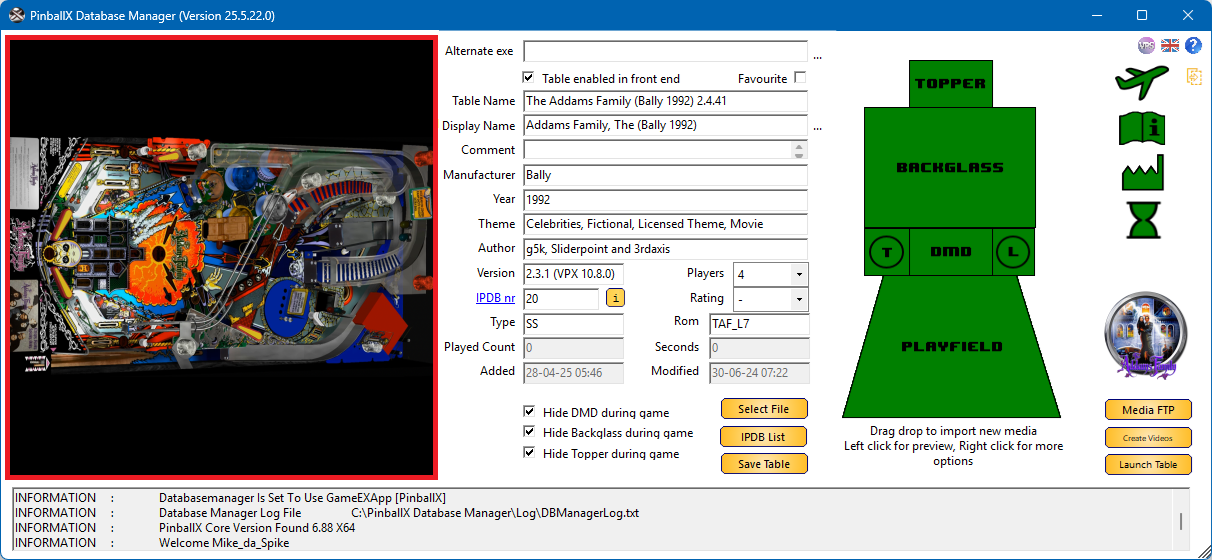
Media files can be previewed directly within the application:
- Left-click on any media icon to preview its content
- Images and videos are displayed on the left side of the interface
- Audio files play through your default speaker setup
- Navigating away from the preview closes it automatically
- If you’re using a physical DMD device (e.g. Pin2DMD or PinDMDv3):
Right-click the DMD icon and select Open to launch the media on your DMD
Press ESC to immediately stop playback, or wait for the video to finish
Media Icon Reference
Each icon in the interface represents a specific media type or cabinet component
 |
Represents the Topper of your pinball cabinet |
 |
Represents the backglass of your pinball cabinet |
 |
Represents the Table Audio (audio plays in front end) |
 |
Represents the (real) DMD of your pinball cabinet. |
 |
Represents the Launch Audio (audio that will be played during launch of the game from front end) |
 |
Represents your Playfield of your cabinet
 |
 |
InGame image icon. Only available for Topper, Backglass and DMD. When launching a game, the video will be replaced by the image and will stay there during emulator run time. |
 |
FullDMD icon. This will be available when “Keep Aspect - FullDMD” is set to ‘Yes’ within your settings.exe from PinballX. |
|
 |
Images to be used for the flyer |
 |
Images to be used for instruction cards
|
 |
Images used for manufacturer. Can use naming convention of years as PBX does (manually adjustment on file) Use the following in the filename: Bally (1980), Bally (-1980), Bally (1980-), Bally (1982-1988). |
 |
Images to toggle the advanced video ⎘- Shows Promo, Tutorial and Gameplay Icons |
 |
Videos to be used for promo |
 |
Videos to be used for tutorial |
 |
Videos to be used for gameplay |
 |
Videos/Images to be used when launching table in front end (only be active when next plugin is used : https://www.gameex.info/forums/topic/23127-plugin-pinballx-loading-video-image-changer-de-randomiser-v2/) |
 |
Point of view file for Visual Pinball. Can be enabled/disabled in |
 |
VBS file for Visual Pinball. Can be enabled/disabled in settings |
 or _.png) |
Wheel image. Shows the ‘no image found’ image when no image is assigned to the wheel and will display only text in the front end When an image is assigned, it will shows directly the image |
 |
Underlay image, that can be used for systems and tables view in front end (will be available when ‘System List’ is enabled in front end) and the table list has the ‘System list media’ selected Underlay images are presented above the playfield image, but the wheel image will be showed on top of it. Use transparent files for underlays |
 |
Overlay image, that can be used for systems and tables view in front end Overlay images are on top of everything, so even the wheel images are showed below the overlay image Use transparent files for overlays |