The Action Log is a small horizontal bar located at the bottom of the main screen. As you use Database Manager, it continuously logs information about various actions you perform.
Expanding the Action Log
- Double-click on the Action Log to open it in a separate window for easier review.
- The detached window can be moved and kept open while actively updating new entries in real-time.
Startup Checks
When launching Database Manager, several system checks are performed. While we won’t cover every check, here are the most critical ones:
- Verify installation of PinballX/Touch Play and check their versions.
- Inspect PinballX/Touch Play settings for potential issues.
- Confirm internet connection on the device running Database Manager.
- If connected to the internet, additional checks include:
- Checking for a new version of Database Manager.
- Checking for an updated VPS-DB JSON file (by Fraesh).
- Verifying GameEx FTP accessibility (with correct credentials).
- Retrieving your GameEx website username.
Example Action Log During Startup
Most of this information is recorded in the Action Log.
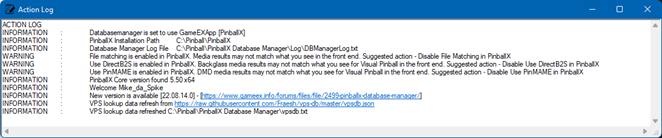
Some warnings may be displayed during startup, these checks are recommendations from Scutters and Mike Da Spike.
While they are not enforced, ignoring them could lead to unexpected behavior within your front-end system.