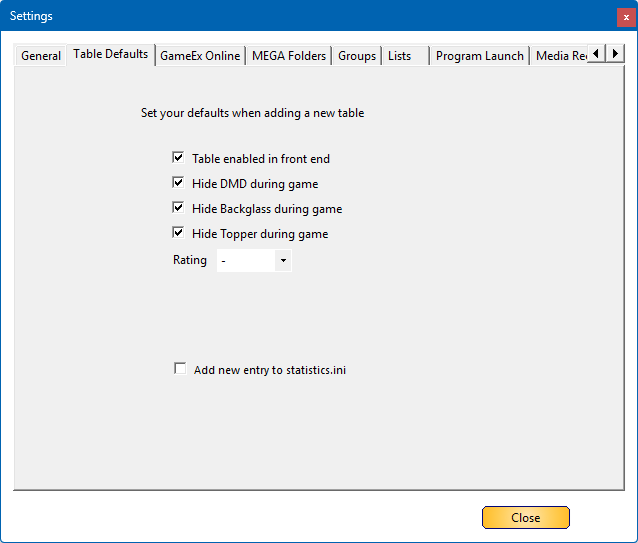
Within the Table Defaults tab, you can configure default settings for new tables you add.
These settings will automatically apply to every new table created within the selected system.
If you want to set defaults for a different system, simply switch systems in the main form and adjust the settings accordingly.
Below is a detailed breakdown of the settings for this section:
 |
¶ Table enabled in frontendCheck this box if all new tables that you add, must be enabled in your front. Uncheck this when all new tables will not be shown in the front end and you first want to test the new tables |
 |
¶ Hide DMD during GameCheck this box if all new tables that you add, must hide the PinballX DMD media during gameplay. Uncheck this when all new tables needs to show the PinballX DMD media (video or image) during game play. It can happen that your emulator overwrites this media with their own media. That could give a nice transition effect from your front end to your emulator |
 |
¶ Hide Backglass during GameCheck this box if all new tables that you add, must hide the PinballX Backglass media during gameplay. Uncheck this when all new tables needs to show the PinballX backglass media (video or image) during game play. It can happen that your emulator overwrites this media with their own media. That could give a nice transition effect from your front end to your emulator |
 |
¶ Hide Topper during GameCheck this box if all new tables that you add, must hide the PinballX Topper media during gameplay. Uncheck this when all new tables needs to show the PinballX topper media (video or image) during game play. It can happen that your emulator overwrites this media with their own media. That could give a nice transition effect from your front end to your emulator |
 |
¶ RatingSet your default rating for new tables - Undefined rating NOTE: Rating a table within PinballX will result in the loss of all relevant data associated with that table in Database Manager. |
 |
¶ Add new entry to statistics.iniStatistics.ini is used by PinballX to keep a record how many times you launch the table, times played and keeps your high score saved and displayed in the front end (if set to display). This will record exactly when the table was added to PinballX instead of launching PinballX first. |