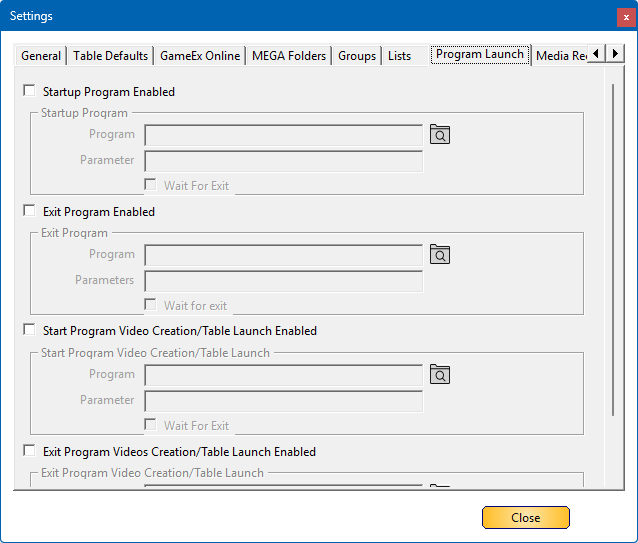
The Program Launch tab allows you to configure specific programs, commands, or batch files to run automatically when Database Manager starts or exits. This feature ensures that essential tasks or adjustments happen seamlessly during these events.
Additionally, a special section is available for launching PinballX, enabling users to start a table or create a video as part of their workflow.
Example Use Cases
- Rotate your screen before launching the program.
- Open specific file explorers for quick access.
- Adjust screen resolution upon startup or exit.
- Run scripts to generate loading videos automatically.
This functionality streamlines setup and automation, making customization more flexible for users.
Below is a detailed breakdown of the settings for this section:
 |
¶ Startup Program EnabledCheck This box, if you want to run a program when Database manager starts |
 |
¶ Exit Program EnabledCheck This box, if you want to run a program when Database manager exits |
 |
¶ Start Program Video creation/Table Launch EnabledCheck This box, if you want to run a program when Database launches PinballX. |
 |
¶ Exit Program Video creation/Table Launch EnabledCheck This box, if you want to run a program when Database launches PinballX. When PinballX stops, it will run this command. |
 |
¶ ProgramAll the 4 sections have a program to start.  |
 |
¶ ParameterThis is optional. If your program needs a parameter to run, you can set a parameter to it. |
 |
¶ Wait For ExitIf checked, the program will run and Database manager will wait until it exits. |